Intel vs Motorola Byte Order in CAN DBC Files
Intel or Motorola? See how each byte order places a CAN signal's bits, what the DBC start bit and @0/@1 really mean, and why the same bytes decode differently.
Intel byte order (@1 in a DBC) puts the low byte of a multi-byte signal first, and the DBC start bit names the signal's least significant bit. Motorola byte order (@0) puts the high byte first, and the start bit names the most significant bit. The same payload and the same start bit therefore select different bits and give different numbers, which is why a wrong byte order is the first thing to check when a decoded value looks wrong.
Same bytes, two values
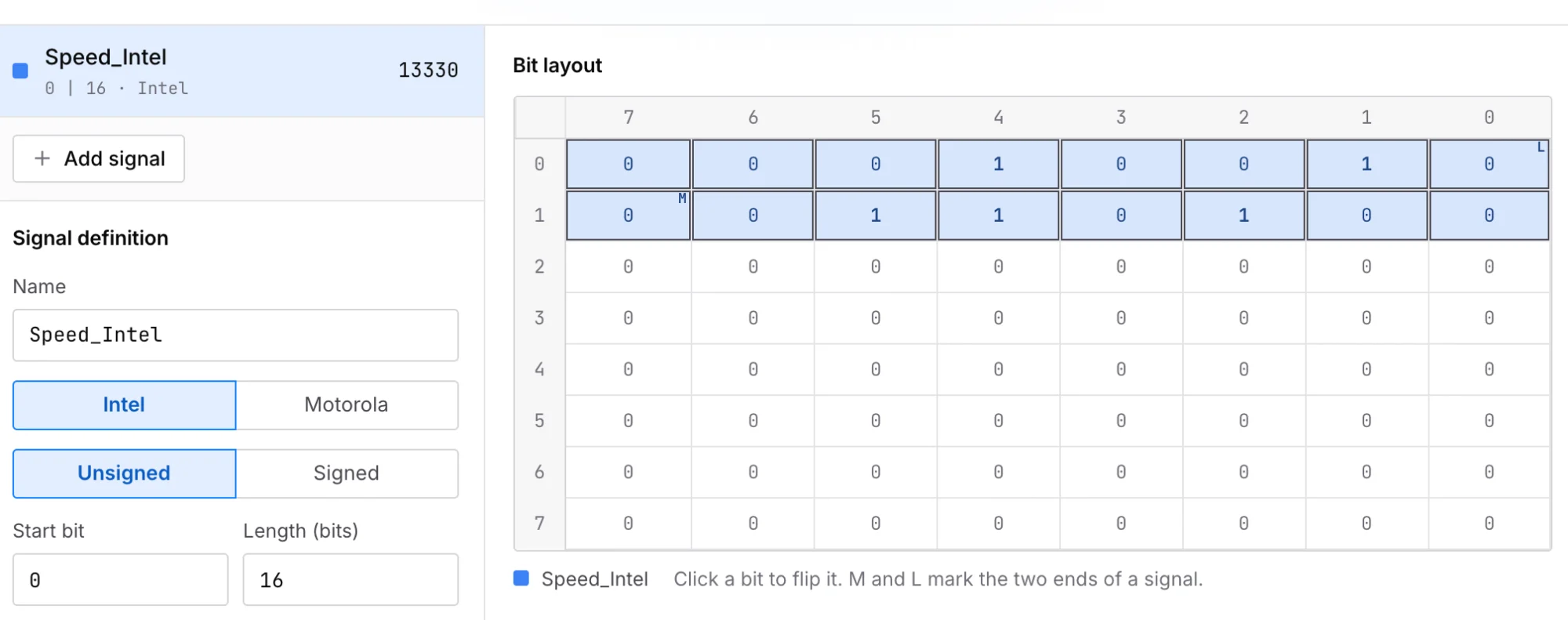
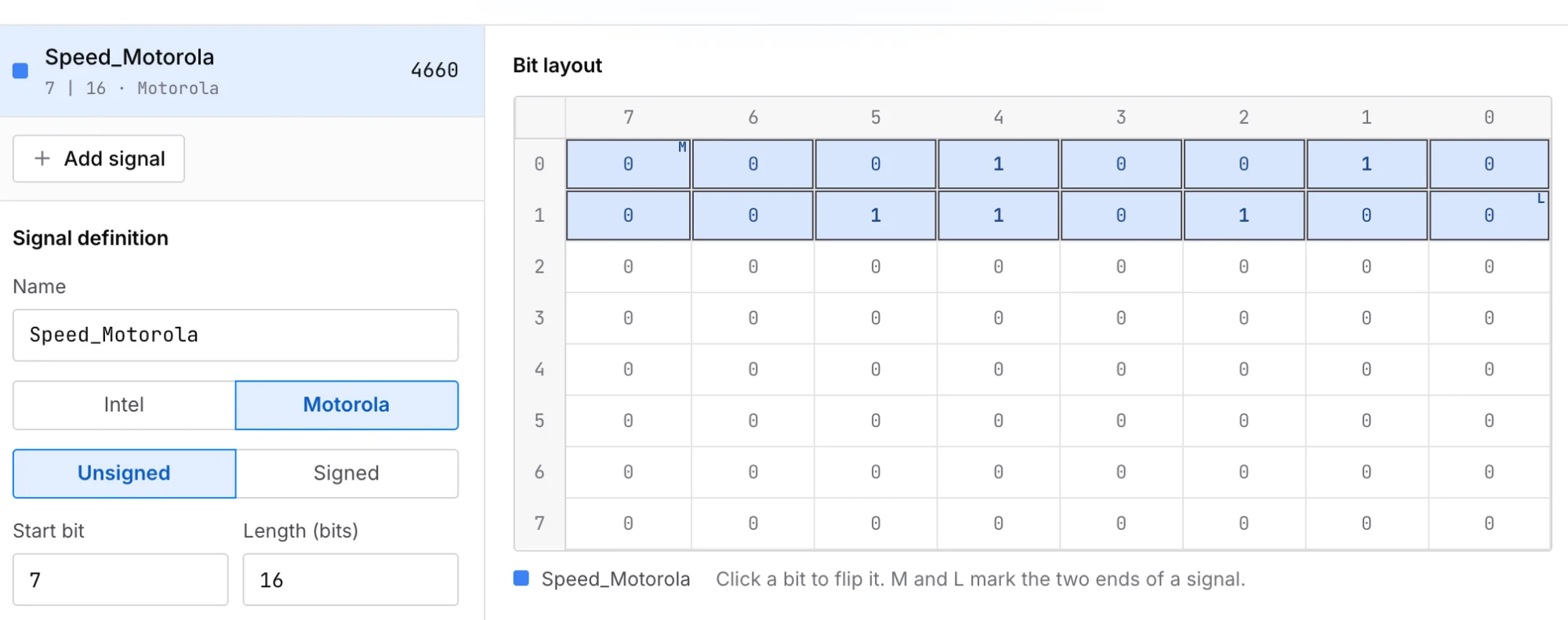
Take an 8-byte frame 12 34 00 00 00 00 00 00 and a 16-bit unsigned signal with factor 1. Decode it twice in the CAN signal calculator:
| Byte order | DBC start bit | Bits used | Raw value |
|---|---|---|---|
Intel (@1) | 0 | byte 0 bit 0 (LSB) up to byte 1 bit 7 (MSB) | 0x3412 (13330) |
Motorola (@0) | 7 | byte 0 bit 7 (MSB) down to byte 1 bit 0 (LSB) | 0x1234 (4660) |
Both definitions cover exactly the same 16 bits. What changes is which byte is treated as the high byte:
payload    12 34 00 00 00 00 00 00

Intel      high byte = byte 1, low byte = byte 0   →  0x3412 = 13330
Motorola   high byte = byte 0, low byte = byte 1   →  0x1234 = 4660
The start bit differs too, because each order counts it from a different end of the signal.
What @0 and @1 mean in a DBC line
A signal in a DBC file is one SG_ line:
SG_ Speed : 7|16@0+ (1,0) [0|65535] "" Vector__XXX
Read it left to right:
7|16is the start bit and the length in bits.@0is the byte order:@0is Motorola (big endian),@1is Intel (little endian).+means unsigned;-means signed (two's complement).(1,0)is the factor and offset, used as shown below.[0|65535]is the minimum and maximum,""the unit, and the last field lists the receiving nodes.
The byte order is set per signal, not per message or per file. One message can contain an Intel signal next to a Motorola one, so check the flag on the exact signal you are decoding.
How the start bit is counted
DBC files number the bits of the payload the same way for both orders: bit 0 is the least significant bit of byte 0, bit 7 is its most significant bit, bit 8 is the least significant bit of byte 1, and so on. The difference is where the signal sits relative to that number.
Intel: the start bit is the LSB
The signal starts at the start bit and grows upward. When it reaches bit 7 of a byte, it continues at bit 0 of the next byte. A 16-bit Intel signal at start bit 0 fills byte 0 and then byte 1, and byte 1 holds the high part of the value.
Motorola: the start bit is the MSB
The signal starts at the start bit and runs down toward bit 0 of the same byte. When it reaches bit 0, it jumps to bit 7 of the next byte and keeps going down. On a bit grid this zigzag looks like a saw blade, which is why it is often called sawtooth numbering.
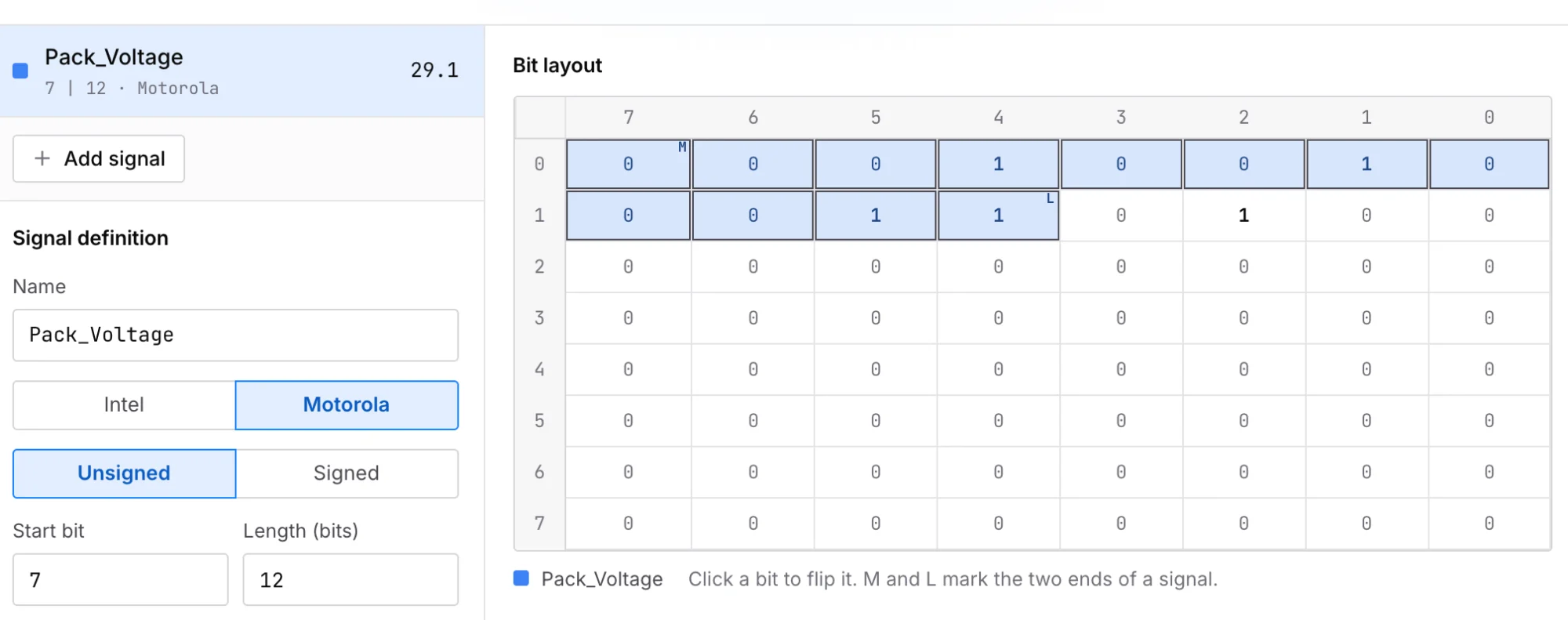
A signal that does not end on a byte boundary shows the pattern most clearly. The calculator's built-in example is a 12-bit Motorola signal at start bit 7 over the same payload. It takes all of byte 0 and the top four bits of byte 1:
Motorola, start bit 7, length 12, factor 0.1

bits       byte 0 bits 7…0, then byte 1 bits 7…4
raw        0x12 (8 bits) followed by 0x3 (4 bits)  →  0x123 = 291
physical   291 × 0.1 = 29.1
Why your tool shows a different start bit
This is where most hand-entered definitions go wrong. The DBC file stores a Motorola signal's start bit as the position of its MSB. Some tools show a different number for the same signal. The canmatrix notes on signal byte order give an example: a 32-bit Motorola signal stored with start bit 7 in the DBC text is shown as 24 in CANdb++, which is the position of its LSB. For our 16-bit signal, the LSB is at bit 8.
If you copy that displayed number into a tool that expects the DBC convention, you get a different signal. Entering Motorola, start bit 8, length 16 into the calculator makes the signal begin at byte 1 bit 0 and run on into bytes 2 and 3. In this frame those bytes are zero, so the value comes out as 0 instead of 4660, with no error.
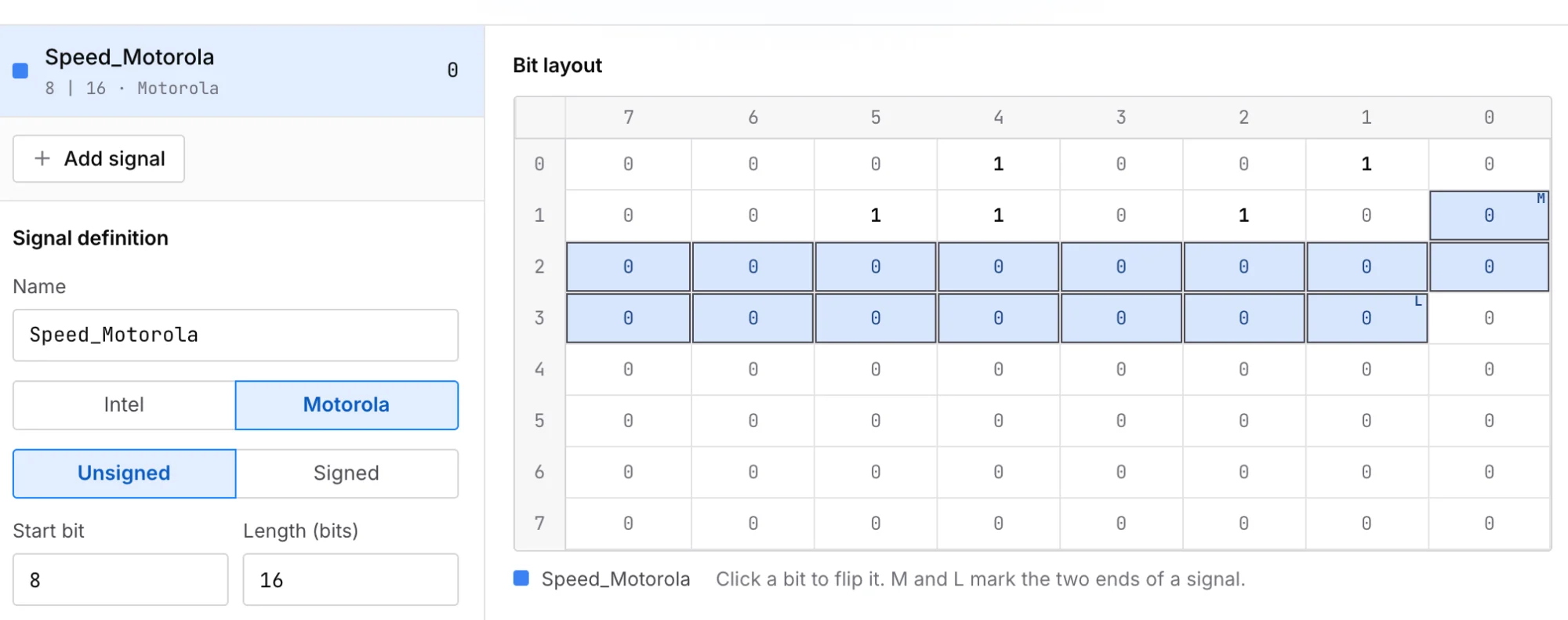
A shifted start bit does not always produce an obvious error. In a frame where the neighbouring bytes carry other signals, you get a plausible but wrong number. When a value is off, compare the start bit in the DBC text with the one your tool displays before changing anything else. MathWorks documents the same kind of difference between AUTOSAR and its own toolbox numbering for big-endian signals.
Byte order and signed values
Signedness is a separate flag (+ or -), but it fails in a similar, silent way. A signed signal is stored in two's complement. For a signal bits long whose bits read as an unsigned number:
Take a 12-bit Intel signal at start bit 0 with factor 0.1. Here , so any of 2048 or more is a negative number:
Intel, start bit 0, length 12, factor 0.1, payload 9C FF

bits       byte 1 bits 3…0, then byte 0 bits 7…0  →  0xF9C = 3996
unsigned   3996 × 0.1 = 399.6
signed     top bit is set, so 3996 − 4096 = −100   →  −100 × 0.1 = −10.0
If a temperature or torque that should go negative instead jumps to a large positive number, check the sign flag after the byte order.
Which byte order will my DBC use?
You cannot assume one. Public sources disagree on which is more common: the OpenXC firmware documentation says big endian is the most common in automotive networks, while embdx describes Intel as the more common order in modern CAN. Since the flag is stored on every signal, read @0 or @1 from the DBC rather than guessing.
If you have no DBC at all, find a value you can change on purpose, such as a pedal position or a counter, and watch its frame. Filter the trace to that ID and move the value slowly in one direction. The byte that changes on almost every step holds the low part of the value; the byte that changes only now and then holds the high part. If the high part sits in the lower-numbered byte, the signal is most likely Motorola.
Checking a whole DBC
The calculator works on one frame at a time. To review every signal in a file, open it in the DBC viewer, whose bit layout shows start bit, byte order, factor and offset for each signal. A byte order mistake often shows up as two signals claiming the same bits or a signal running past the end of the frame; the DBC checker reports both, with line numbers. To decode a whole recording rather than one frame, see how to open a BLF file without CANoe.
Paste one of your own frames into the calculator and switch between Intel and Motorola to see which reading matches the value you expect.
Open a log. See the signal.
Open a BLF, MF4 or ASC file in your browser. Nothing is uploaded.
Open workbench